
A modular connector
Synchronise inventory without importing orders, handle orders without changing the catalogue, or publish selected new offers.
Exchanges run in background batches. You may close the browser. The actual delay depends on the configured interval, catalogue size and WordPress scheduling.
Open WooCommerce → Boostlab Sellermania. Bibliopolis POS shipping, accounting and franchise management are separate features and are not included in this standalone plugin.
Interface language
The plugin follows the language of your WordPress user profile, with the site language as the default. Choose French or English under Users → Profile → Language. The English catalogue supports English locale variants, including US and UK English. Changing the interface language does not translate product descriptions or marketplace order content.
Before you start
| Requirement | Details |
|---|---|
| WordPress & WooCommerce | WordPress 6.5+, active WooCommerce 8.5+. Also meet the requirements of your installed WooCommerce version. |
| Hosting | PHP 8.1+ with OpenSSL, MySQL/MariaDB supporting GET_LOCK, HTTPS and outbound API access. |
| Scheduling | Action Scheduler, normally included with WooCommerce. A reliable server cron is recommended. |
| Sellermania | An active account with API access enabled, account username, REST App ID and application secret. |
| WordPress permissions | A user with WooCommerce management permissions. Never put secrets in a public page. |
- Back up files and database and verify the restore procedure.
- Identify every existing stock writer to prevent duplicate deductions.
- Check SKU matches, excluded products and chained offers.
- Test with a separate Sellermania sandbox account before live use.
Request a sandbox account from Sellermania support. Selecting sandbox does not convert production credentials into test credentials.
Install and activate in WordPress
- Download the Boostlab ZIP
Keep the archive compressed. Use the download provided on this page.
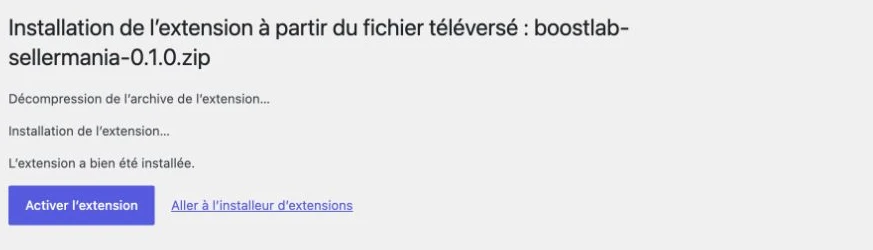
- Open Plugins → Add New Plugin
Choose Upload Plugin, select the ZIP and click Install Now.
- Activate the plugin
Wait for the success message, then activate. Check the author is Boostlab and the installed version is 0.1.2.
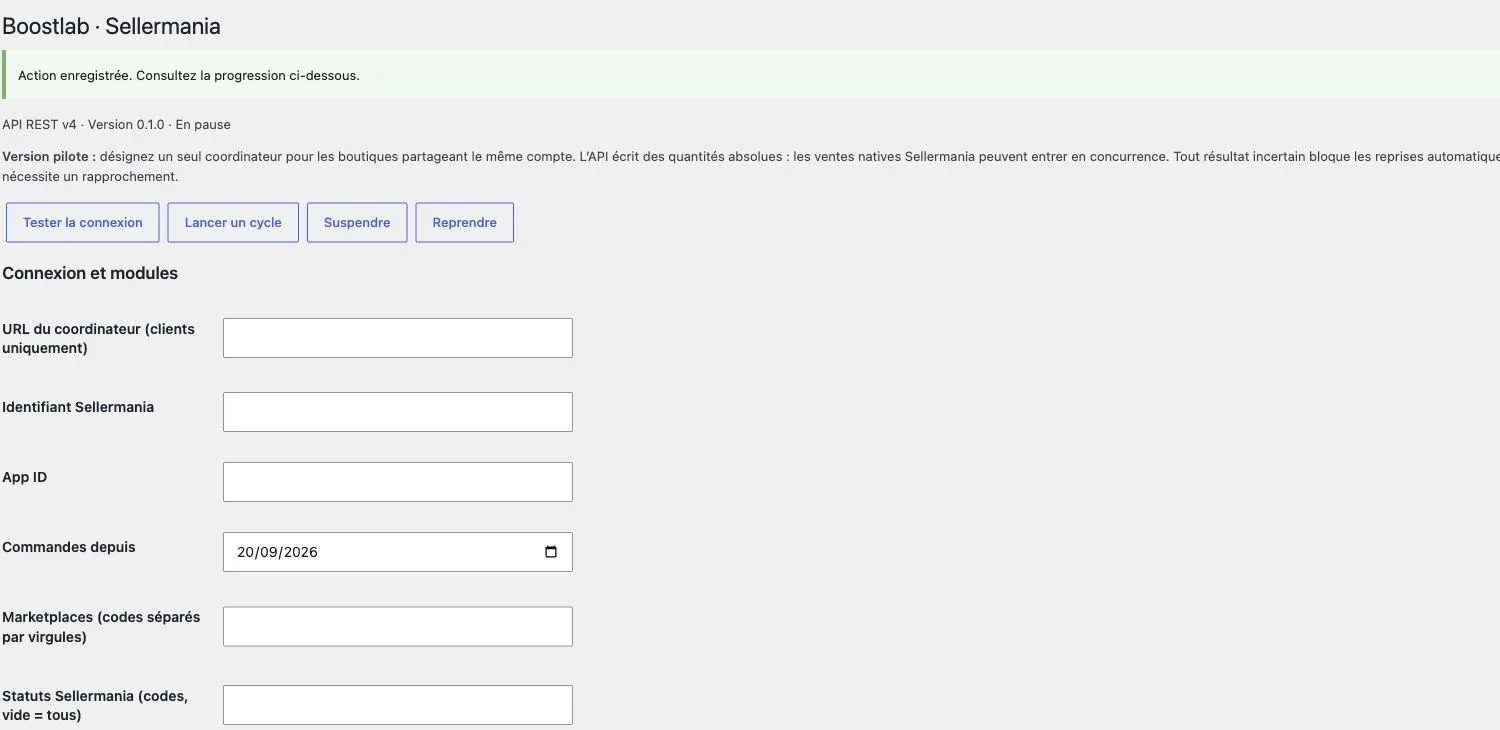
- Open WooCommerce → Boostlab Sellermania
Paused is the expected initial state. Configure the connection before selecting modules.

Enable the REST API
- Check your subscription
Confirm API access is included and enabled. Ask Sellermania to activate it if the option is missing.
- Create a REST application
In Sellermania, open Your account → REST API applications. Use a clear application name such as Boostlab WooCommerce.
- Save the App ID and secret
The secret is available when the application is created. Save it in a password manager before leaving. Use the eye button if the current creation page masks it. Do not include secrets in screenshots or support requests.
- Prepare the account username
Use the Sellermania account email together with the App ID and secret. The plugin obtains and refreshes the access token automatically.
Official Sellermania authentication documentation. API permissions and sandbox availability depend on your account.
Connect your shop
- Enter the three credentials
Fill in Sellermania username, App ID and API secret. Leave Coordinator URL blank for incoming stock only or on the coordinator itself.
- Select the environment
Use sandbox only with sandbox credentials. Clear the checkbox for your production account after completing the required checks.
- Save and test
Click Save settings, then Test connection. The log entry “SellerMania connection verified.” confirms authentication. “Action recorded” alone does not confirm a stock update.
- Select the modules, save and resume
Saving settings pauses processing. Check the selected options, then click Resume. Start a cycle also resumes processing and requests a new cycle.
- Blank API secret
- Keeps the existing secret; it is never displayed again.
- Interval
- 15 minutes by default, configurable from 5 to 1,440 minutes. A full cycle may take longer than this interval.
- Changing credentials
- Changing username, App ID or environment resets account-specific catalogue and order views. Reconcile pending operations first.
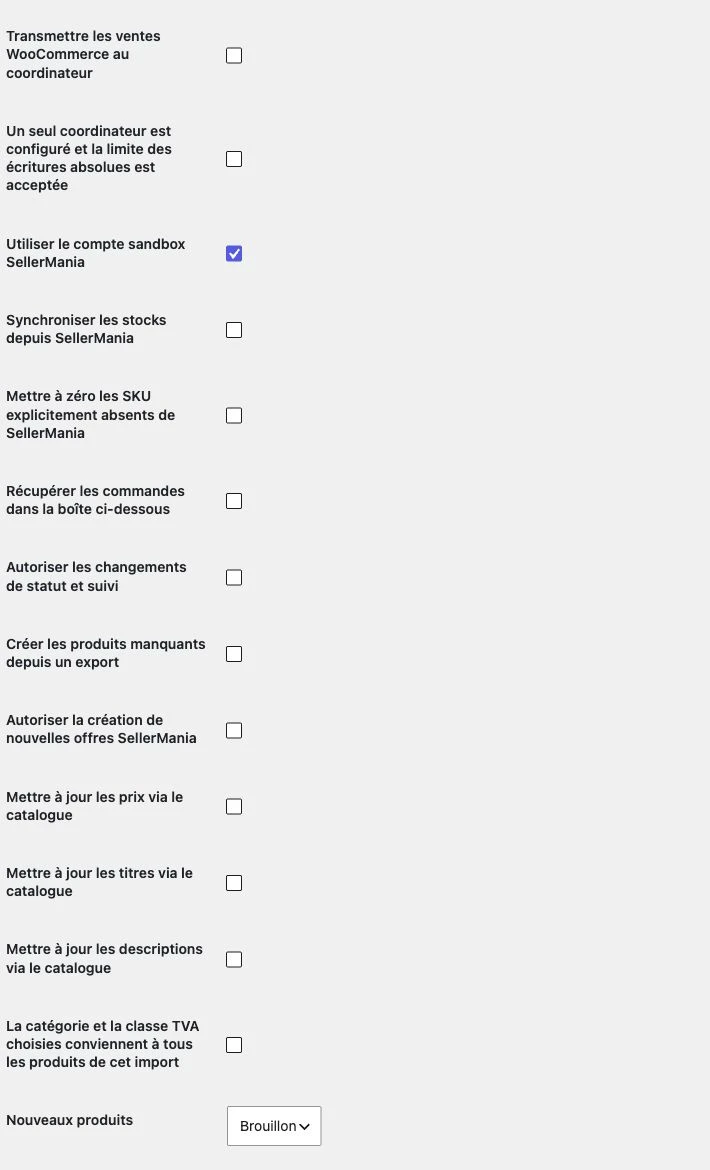
Enable only what you need
Enable incoming stock. This does not send WooCommerce sales to Sellermania; configure outgoing sales separately for shared stock.
| Module | Direction | Effect |
|---|---|---|
| Synchronise stock | Sellermania → WooCommerce | Updates matched SKU quantities, not prices. |
| Send sales | WooCommerce → coordinator → Sellermania | Requires pairing and stock strategy confirmation. |
| Retrieve orders | Sellermania → plugin inbox | Filters by date, marketplace and status. |
| Status and tracking | Plugin → Sellermania | Uses permitted transitions for each order line. |
| Create missing products | TXT export → WooCommerce | Drafts recommended. Category and tax class must be confirmed. |
| New offers | WooCommerce → Sellermania | Manual submission by product ID; existing remote SKU rejected. |
| Prices, titles, descriptions | Export → existing products | Three separate options, disabled by default. |
Match products and receive stock
Matching uses the exact SKU, preserving leading zeroes and case. If references differ, enter the remote reference in the product inventory field Sellermania SKU. An EAN alone does not automatically create a match.
Version 0.1.2 adds EAN mappings: a validated TSV file can link new or like-new offers tagged bibliopolis to existing site EANs. It changes neither quantities nor prices. Ambiguous references and franchise stock are excluded. Explicitly confirm the condition policy before running the matching job.
- Check references and conditions
Each remote stock reserve must match one local product or variation unambiguously. Do not combine new and used offers merely because they share an EAN.
- Set exclusions
Exclude individual products when necessary. Franchise products identified by Bibliopolis metadata are ignored: sellers’ independent stocks must remain separate.
- Enable incoming stock
Select Synchronise stock from SellerMania, save and resume. Compare representative products and review the completed-cycle log.
| API result | Behaviour |
|---|---|
| Known quantity | WooCommerce quantity is aligned, stock management enabled and backorders disabled. |
| Zero | The product becomes unavailable without deleting its page. |
| Explicitly absent SKU | Set to zero only when the corresponding option is enabled. |
| Error or incomplete response | The batch stops for review. An API error is not interpreted as zero stock. |
Chained offers known from an imported export are blocked from automatic writes. A chain missing from that export cannot be identified from the quantity response alone; exclude such references before enabling writes.
Sales across multiple shops
- Choose one coordinator
Set Stock role to Single coordinator on one shop. All other shops must use Coordinator client. Never enable multiple independent stock writers for the same shared reserve.
- Pair the shops
Configure the same random pairing key of at least 32 characters. Enter the coordinator HTTPS stock-events endpoint on each client. Keys are stored encrypted and requests are signed and timestamped.
- Use the same Sellermania seller account
Version 0.1.2 supports different application IDs for the same seller username and environment. Authentication tokens remain isolated per application. Different seller accounts and sandbox/production combinations are rejected.
- Verify product matching and activate sales
Check SKU mappings and exclusions. Enable outgoing sales only once the coordinator, pairing and quantity-write strategy have been validated. Keep incoming stock enabled on each participating shop.
- Verify a complete sale
Check local stock reduction, one outgoing event, the confirmed Sellermania quantity, then propagation to both shops. Do not count the same sale again through a second connector.
Stable event IDs prevent repeated delivery from deducting twice. If a remote write may have succeeded but its result is uncertain, the plugin requires reconciliation rather than automatically submitting it again.
Returns and WooCommerce restocks temporarily exclude the affected product. Reconcile the actual stock in Sellermania before removing the exclusion. The plugin does not automatically add returned quantities remotely.
Import a Sellermania export
- Prepare a recent TXT export
Preserve tabs, headers and references, especially sku and quantity. Avoid spreadsheet reformatting that drops leading zeroes.
- Configure product creation
Enable Create missing products if required. Choose an existing category ID, tax class and Draft status. Confirm that these apply to every new product in the import.
- Choose optional updates
Price, title and description updates are independent. Leave them disabled to preserve existing values.
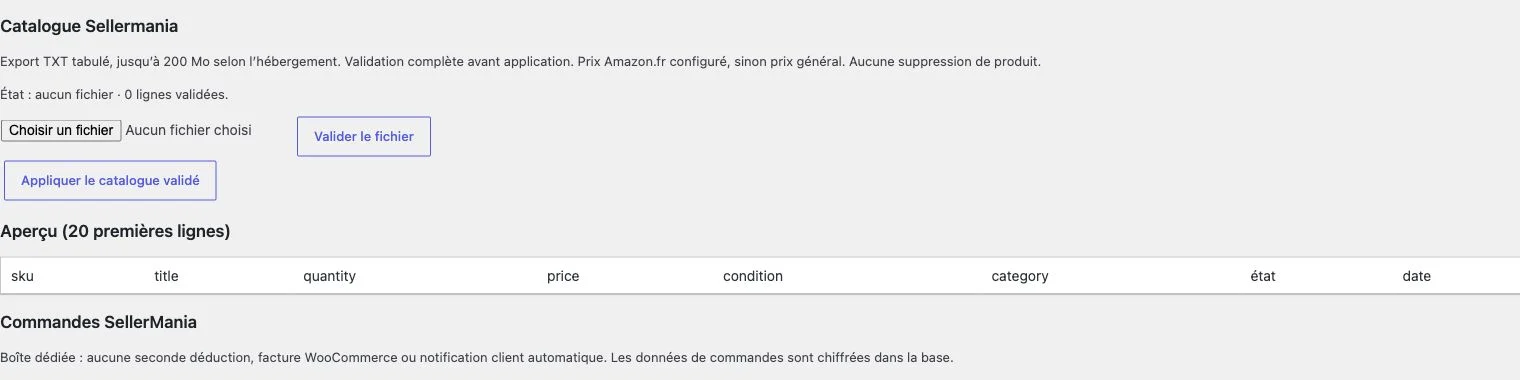
- Validate the file
Select the TXT and click Validate file. Parsing runs in batches. Refresh the plugin page to inspect progress and wait until validation is ready.
- Review and apply
Inspect the first 20 rows, then Apply validated catalogue. Current quantities are fetched from the API when applying. Check new drafts and review messages.
| Data | Rule |
|---|---|
| Price | wishedPriceAmountAZ_FR when provided, otherwise wishedPriceAmount. This is the configured export price, not a live Amazon repricing result. |
| Quantity | Read from Sellermania when applying, even if periodic stock synchronisation is disabled. |
| New product | Requires valid title, price, condition, category and tax configuration. Draft is the default. |
| Condition, EAN, location | Imported when present and recognised. |
| Images | Not imported by this version. Add images before publishing. |
| Existing text | Only changed when the corresponding option is enabled. Empty export text does not erase existing content. |
No products are deleted. File limit: 200 MB maximum, potentially less on your host. Duplicate SKUs block validation. Use separate imports when category or tax treatment differs.
View and process marketplace orders
Enable Retrieve orders in the inbox below. The dedicated SellerMania orders area displays references, items, quantities, statuses and shipping details returned by the API.
- Orders since
- Defaults to the installation date. Choose an earlier date for historical orders.
- Marketplace and status filters
- Enter comma-separated API codes. Blank means no filter for that field. WooCommerce labels cannot replace Sellermania codes.
- Pagination
- The API pages are processed in the background. The interface shows 25 orders at a time; use Next orders when available.
- Allow status updates
Enable the status and tracking module and save.
- Load available statuses
The plugin retrieves permitted transitions for each order line.
- Apply and verify
Select an available status, provide tracking when required, then inspect the result and log.
If the outcome is uncertain, verify the real order in Sellermania before retrying.
Create a new SellerMania offer
- Prepare the product
Set a unique SKU, valid EAN13, recognised condition, positive price and integer managed quantity in WooCommerce.
- Enable new offers
Select Allow new SellerMania offers and save. The remote SKU must not already exist.
- Submit by product ID
Enter the chosen product ID in Create a SellerMania offer and submit.
- Check processing
Use Check upload in Operations and checks. Then verify the offer in Sellermania and on its marketplace.
Submission uses add_modify, but existing remote SKUs are rejected to prevent stock overwrites. Upload acceptance does not guarantee marketplace publication. This version does not send images or automatically enrich product content.
Monitor processing
- Log
- Read connection results, completed cycles and errors before restarting.
- Sales and outgoing stock
- Review pending sales, held references and uncertain events.
- Operations and checks
- Inspect status writes, submitted offers, upload IDs and review items.
- Scheduled actions
- Open WooCommerce → Status → Scheduled Actions, or Tools → Scheduled Actions. Filter the boostlab-sellermania group.
- Pause
- Stops subsequent processing. An in-flight request may already have completed: check its outcome.
- Resume / Start a cycle
- Use after resolving the cause of an interruption. Repeated clicks do not safely accelerate a large catalogue.
Batches: 100 products for stock reads, 50 orders per API page, 500 TXT rows for parsing, 20 products for catalogue application. These are batch sizes, not catalogue limits.
Sellermania documents a quota of 120 requests per minute per account. Other shops and tools share it. The plugin throttles locally, not across every application. HTTP 429 pauses processing. Measure actual propagation time and ask your host to maintain a reliable cron.
Resolve common problems
The menu is missing.
Check WooCommerce and Boostlab Sellermania are active and your user can manage WooCommerce. The plugin is under WooCommerce. Network-wide multisite activation is not supported.
Connection returns 401 or 403.
Verify account username, App ID, secret, environment and API subscription. Production credentials do not work in sandbox. Use the existing saved secret; do not regenerate keys without identifying affected applications.
The plugin is paused after saving.
This is expected. Check settings and connection, then resume. If an error caused the pause, resolve it first.
Jobs or catalogue processing appear stuck.
Inspect Action Scheduler, server cron and PHP limits. Wait for full file validation before applying. The first 20 preview rows are not the import total.
A product is not synchronised.
Compare exact SKU, explicit Sellermania SKU, variation, condition and exclusions. Check duplicates, chained offers and held sales. Never substitute an EAN without identifying the same offer.
Some orders or statuses are missing.
Check start date, filters, pagination and errors. Available statuses depend on the marketplace and order line. Reload permitted transitions.
The log shows HTTP 429 or a database lock error.
For 429, wait and reduce overlapping API traffic. For GET_LOCK errors, ask your host to support MySQL/MariaDB advisory locks. Do not remove the locking safeguard.
Stock differs after a return.
Check physical stock and reconcile it in Sellermania, then remove the temporary product exclusion. Remote restocking is manual.
The offer was uploaded but is not visible on Amazon.
Check the upload result and marketplace errors. Publication requires the marketplace’s content and image requirements to be met.
Access, data and updates
Administration actions check WooCommerce permissions and WordPress nonces. Stored secrets and order data are encrypted using keys derived from WordPress salts. Inter-shop requests are signed and timestamped; SellerMania calls use HTTPS.
- Restrict administration access and protect backups.
- Reconfigure secrets after rotating WordPress salts. A server-side BOOSTLAB_SELLERMANIA_SECRET constant is also supported.
- Choose an appropriate retention policy. This version does not provide configurable automatic order purging.
- Remove credentials and personal data from support logs.
Updating and rolling back
Pause processing, check pending operations and back up files, data and configuration. Test the new version on a copy before replacing the ZIP. Recheck version, connection and settings before resuming.
Deactivation suspends plugin tasks. Uninstalling retains data. Neither operation reverses remote stock or status changes: reconcile completed operations when rolling back.
Checks and operating limits
The 0.1.2 source passes 129 unit and simulated API checks, including cross-application seller matching, rejection of another account and duplicate-sale protection. These tests do not establish that live shops have completed a stock cycle.
- Check an available product, a zero-stock product, an excluded product and a variation.
- Validate a representative small catalogue, including prices, conditions, tax and category settings.
- Test permitted order changes in a test environment.
- Verify one sale through the coordinator, remote stock and all receiving shops.
- Test uncertain responses, restarts and restocks without replaying a deduction.
Measure hosting performance, scheduling and quota behaviour. The connector does not claim Sellermania certification, an independent security audit or a guarantee against overselling. Keep a record of acceptance tests before extending the scope.
Downloads and help
ZIP archive · GPL-2.0-or-later · Author: Boostlab. Use Print / PDF and your browser’s Save as PDF option to keep a copy of this guide.
- Sellermania REST API documentation
- Application creation and authentication
- REST v4 technical reference
Sellermania and WooCommerce are trademarks of their respective owners. The connector is developed by Boostlab; no official certification or affiliation is claimed.
Back to top ↑